Compatible with Chrome and Edge
Instruction Guide
We have a simple tutorial guide which explains the features of the software extension and what each button inside the extension does. Read our tutorial and welcome guide on how to use the extension to the fullest. Use all the features of this browser software.
If you are interested in other web extensions to install, you might wish to check out the Microsoft Bing Search with Rewards extension.
Microsoft Bing Search with Rewards Extension
It allows you to complete daily offers to get points.
Track the number of points you have currently and the rewards you can redeem with these points.
The ways to get points & get rewarded is search with Bing, browse with Microsoft Edge and shop at the Microsoft and Windows stores to earn rewards.
Sponsored Link:
Other useful extensions
Another extension which would be useful to install is the iCloud bookmarks extension.
It allows to keep your Chrome bookmarks on Windows synced up with the Safari bookmarks on your iPhone, iPad, and Mac.
iCloud will store your website bookmarks so it is accessible even on your iPhone and Mac.
Try these other two extensions and see if it will boost your daily productivity.
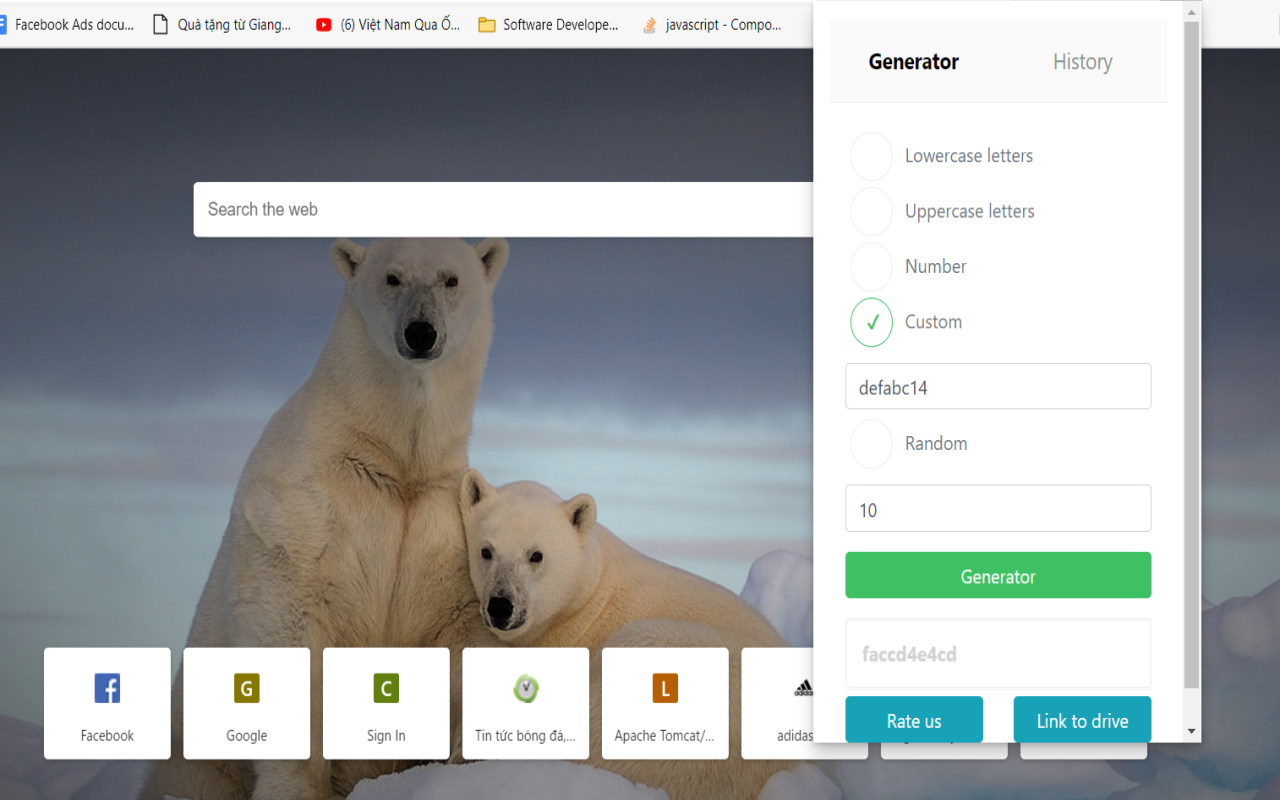
-Simple tool to generate strong and secure passwords With this extension you can easily generate strong and secure passwords.
- You can specify password length and used chars (lowercase, uppercase, numbers or custom).
- Generated password can be copied directly to your clipboard, the passwords are NOT saved online.So you can ensure the security of your password - You can specify password length and used chars (lowercase, uppercase, numbers or custom). - Generate random password
- Generate custom password.
- Password history data storing.
- Remember password for next times
Features:
Click on the button generator to generate a secure password.
Creating a password is easy. Creating a secure password is not.
Password security is important because of how easily hackers can access your data. The longer and more complex your password is, the harder it will be for hackers to crack.
Here are some tips for creating strong passwords:
Use a combination of upper- and lowercase letters, numbers and symbols. For example: "$$$!
What are some popular desktop password generation software?
Here are some of the most popular options:
- KeePass
KeePass is a free and open source password manager that can be downloaded as an application or an installer for Windows, Linux and Mac OS X. It stores all your passwords in a digital vault which is encrypted using several different methods, including AES and Twofish. KeePass comes with a built-in password generator that creates random passwords of any length and complexity you need. It also has support for importing files from other password managers as well as exporting your data to CSV format.
- LastPass
LastPass is another popular option when it comes to choosing a password generator software for your desktop computer. It works seamlessly with all major browsers including Firefox, Internet Explorer, Google Chrome and Opera (on both Windows and Mac). LastPass's free version allows you to create unlimited accounts
Tutorial:
- Install the Extension
- After installing the extension, click on the icon on the toolbar.
Sponsored Link: